
Website specifications
Are you planning to develop a new website? Do you want to maximize your chances of success? Do you want to avoid unpleasant surprises?
If the answer to these questions is yes, then you need to write a project brief (specifications) for your website.
A comprehensive and well-written brief will guarantee the smooth running of your web project, and above all, it will give you the best chance of receiving a result that closely matches your expectations.
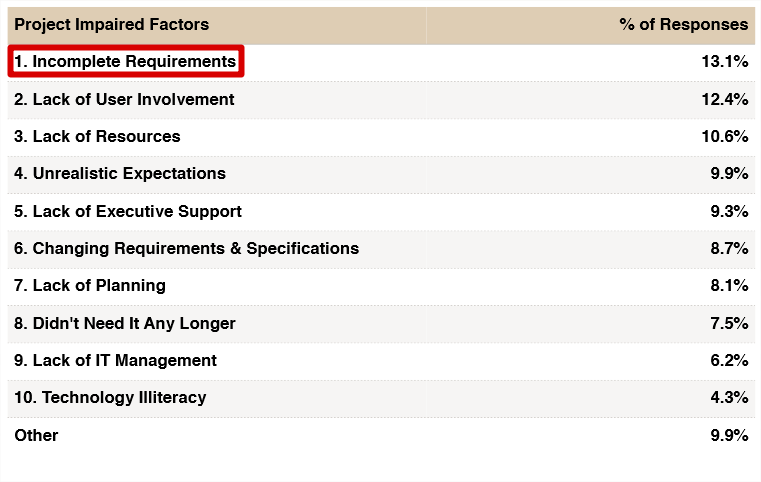
According to a report produced by The Standish Group dating from 2015 (the 2020 report has not yet been published), the primary cause of IT project failure is an incomplete specification document.
In this guide, we will describe the key elements of an effective project brief and why they are important, as well as what we have learned since founding our agency in 2012.
Please note: at Aventique, you can consult us with a simple expression of needs. This will allow you to get an initial estimation of the cost and timeline. We can subsequently help you finalize a formal project brief.
Also, if you wish to outsource the writing of your project brief, please be aware that we offer this service.
- What is a project brief (specifications)?
- The objectives of a website project brief
- Who might need the project brief?
- Who should write the project brief?
- The core components of a website project brief
- 1 • Presentation of the project context
- 2 • Design and website content
- 3 • Features and technical specifications
What is a project brief (specifications)?
A project brief for a website serves to define its objective, features, and behavior. In other words, it defines what the website is for, what it must do, and how it must do it.
There may be variations in the content of the document, but it must fulfill the main objective: ensuring that the project owner and the custom web development team have clearly agreed on the details of the future website. A well-made document leads to accurate estimation and implementation.

The objectives of a website project brief
Writing a project brief meets several objectives:
- It explains the project to your development team (internal or external) as well as to all stakeholders (management, different departments, design team, etc.).
- The act of putting your project down on paper allows you to refine it and complete it in the smallest details.
- It allows you to obtain estimates and put different service providers in competition.
- It is a working basis that gives providers the opportunity to propose innovative solutions to your needs while respecting your constraints (resources, deadlines, objectives…).
- It constitutes a basis for comparison between deliverables and your expectations.
- It helps you avoid damaging omissions.
- It provides a clear vision of the actual scope of work and the resources needed to complete the project.
- It anticipates any conflict with your provider by clarifying everything from the start with a reference document.
- Finally, the brief constitutes, on a legal level, a contractual document that protects you in case of potential misunderstandings with your development agency.
Who might need the project brief?
Different people may be required to consult the project brief:
- The project owner refers to the brief to check if the developed functionality corresponds to what was planned.
- The project manager will be able to assign resources to tasks and develop a realistic schedule for the project.
- The technical lead uses the brief as a starting point to define the technical specifications of the development.
- Front-end developers to integrate mockups into web pages (HTML, CSS, and JavaScript). They also need the brief to implement the expected front-end behavior.
- Testers use the document as a basis for establishing detailed test scenarios.
- For the support team, it serves as their reference source for quick information on features when resolving bugs and performing continuous optimization.
A good project brief must meet the needs of the different teams involved in the website project.
Who should write the project brief?
The project owner must be the main contributor to the brief, even if they are not the one responsible for writing it.
Within the framework of a corporate project, all concerned departments must be involved at least in a consultative manner.
The lack of team involvement represents one of the causes of IT project failure according to a study conducted by The Standish Group.
The core components of a website project brief
Depending on the project, the size of the document can vary between 10 and 100 pages, or even more for complex web projects (CRM, business tools, certain startups…).
Everything relevant to the project must be included in your document. Generally, a brief for a web project is organized around four main axes:
- Presentation of the project context.
- Design and website content.
- Features and technical specifications.
- Expected services and provider selection methods.
Let’s get down to business. Follow the guide. 🤠
1 • Presentation of the project context
This section should provide an overview of the project and the organization leading it. It will answer the following questions:
- About your organization: a brief presentation of the company.
- What problem are you trying to solve? Why is the project necessary?
- Project scope: is it a redesign of a few pages, a complete website redesign, or a brand new website?
- Target market: who is this website intended for?
1.1. Company presentation
Present your company by mentioning:
- brief history;
- date of creation;
- core business;
- services or products sold;
- competitive advantages;
- number of employees;
- turnover (revenue);
- main development axes.
Do not hesitate to add any information that might interest your service provider.
If it’s a redesign of an existing website, specify its monthly traffic, some performance statistics (bounce rate, conversion rate…), the number of existing pages to migrate, the technologies used…
1.2. Your competitors
The more detailed knowledge your provider has of your competitors, the more they will be able to help you stand out.
List your main competitors and note what they do. Who has the best website and why? Who isn’t so great and what are the reasons?
It is these details that will help you “beat them,” by improving what others offer, ensuring your site remains distinct, and of course, by drawing inspiration from the best practices available.
Oh, and this part is also useful for helping your partner agency better understand your sector.
1.3. What type of site do you want to develop?
There are many types of websites; explaining it clearly will help your provider understand the challenges and the points on which they must focus.
Here are some examples:
- Showcase site: used to present a company or a product.
- E-commerce site: used to present products with the goal of immediate online sales.
- Blog/Media: used to publish articles.
- Portfolio: used to present achievements, often of an artistic nature (designs, architectural mockups, videos, photos, etc.).
1.4. Objectives
Explain the role of the web project in your company’s global strategy. Why did you think about creating/redesigning your website? What is the main objective you want to achieve?
Once your main objective is clarified, you will present your secondary objectives if you have any. You can also present your objectives by splitting them into two categories: quantitative and qualitative.
1.4.1. Qualitative objectives
Examples:
- Attract prospects by positioning yourself on certain keywords.
- Increase your conversion rate.
- Improve product suggestions to increase turnover.
- Refresh an outdated design.
- Optimize the site’s loading speed, etc.
1.4.2. Quantitative objectives
Examples:
- Reduce the bounce rate of the homepage from 80 to 65%.
- Increase site traffic by 1000 visitors per month within 3 months.
- Reach second place in Google search results for the keyword: “Web development agency Paris”.
- Achieve 50K euros in turnover by the end of the year.
- Generate 20 prospects per month via the contact form.
1.5. Your target audience
A website must be designed with the audience it will address in mind. A site intended for teenagers will use a certain design and vocabulary that would not be used on a site intended for seniors.
Here is the information to provide in this section:
- Are you targeting businesses (B2B) or individuals (B2C)?
- What are the characteristics and interests of your different targets?
- Identify the different segments making up your target (for example SMEs and large corporations) and prioritize their strategic importance.
Have you listed them? Now, for each group, consider:
- What do they want to do on your website?
- What do you want them to do on your website?
1.6. Team
In the case of a project involving multiple departments/stakeholders, it is useful to include job titles/roles in the project and their email addresses. The project manager should be highlighted here. For example:
| Full Name | Title/Role | Involvement in the project | Contact |
| Rachel Leloutre | CEO | To be included in email exchanges. | rachel.leloutre@aventique.com |
| Guillaume De Chatel | Marketing Director | To be consulted for decisions related to e-commerce features. | guillaume.dechatel@aventique.com |
| Sarah Bustros | Web Content Manager | Primary point of contact for the provider. Project Manager. | sarah.bustros@aventique.com |
1.7. Description of existing assets
- Is there already a previous version of the site online?
- Do you own the domain name you wish to use?
- Do you have hosting intended for the new website?
- Do you have presentation documents for your company and its products?
- What resources are available (logos, graphic elements, texts…)?
- Are there internal or external human resources already allocated to the project (project manager, web designer, webmaster…)?
2 • Design and website content
In this second step, you must provide and specify the graphic aspects of the website.
2.1. Website Wireframes / Mockups
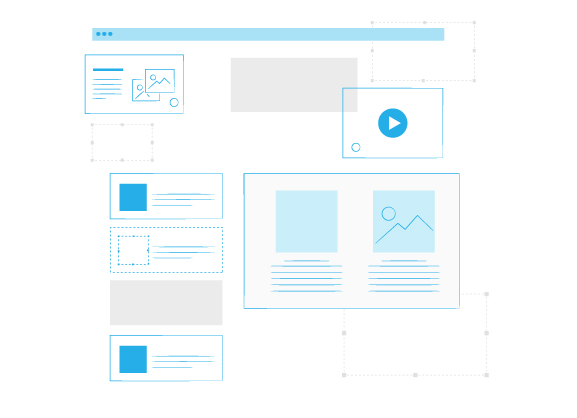
The content of this section will depend on whether a mockup already exists or if the creation of mockups is part of the provider’s mission.
If the mockup is already finished, it should be provided here. If the mockup is part of the provider’s missions, you will need to give the constraints and the desired stylistic direction.
Do not hesitate to provide the following elements to your provider; this will greatly help guide their design work:
- Brand guidelines: colors, fonts, logo variations, and other graphic elements used by the brand.
- Printed material: brochures, business cards, product presentations, company presentations, etc.
- Competitor analysis: what you like and what you don’t like on competitors’ websites.
- Examples of websites you like and dislike.
Do you have specific requirements regarding the design of your site?
- Flat design.
- Material Design.
- Parallax effect.
- Animations.
- Specific interactions.
If your requirements call for specific animations and interactions on the interface, the choice of front-end framework will directly determine how smoothly they work. Vue.js is ideal for developing animated and interactive web interfaces thanks to its native transition system, which brings even the most ambitious designs to life without compromising performance
2.2. Graphic charter / Style guide
The graphic charter is a starting point that will guide the designer’s work. If you have one, provide it to your provider. A graphic charter generally contains the following elements:
- the logo with its variations;
- primary and secondary colors;
- typographic rules and fonts.
If you don’t have a graphic charter, you must indicate to your provider if they should create one or if you will handle it. Note that a formal charter is not systematically required by providers.
2.3. Responsive design
Although it has become common knowledge these days, responsive design is now an essential requirement that should be explicitly included in your specifications. From a technical standpoint, Next.js ensures responsive and high-performance websites across all devices thanks to its hybrid rendering, which optimizes the user experience on both mobile and desktop without incurring additional development costs.
A provider won’t be able to tell you it wasn’t indicated in your specifications.
2.4. The good, the bad and the ugly… Sites that inspire you
Have you ever come across sites that are not really to your taste? What about sites that caught your attention?
Having a list of sites you like and dislike will lead your provider more quickly to your ideal design.
2.5. Content information
- What different types of content do you plan to present on your site (articles, images, videos, downloadable resources…)?
- Provide, as much as possible, the content of each page (texts, illustrations, downloadable documents, etc.).
3 • Features and technical specifications
3.1. Website structure
It is important to determine the sitemap of your website. It is a starting point that clearly transmits the hierarchy of the website’s pages and prevents potential omissions.
A redesign project is often an opportunity to review the site architecture and think about adding/removing pages to adapt to your company’s new context. You can present it in the form of a diagram, as illustrated below.
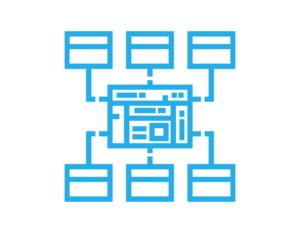
The site architecture allows you to quickly determine:
- the major sections of your site;
- the organization of different categories;
- the main pages.
3.2. Features
During this essential step, you will have to precisely describe the different features of your website. Here are some examples of the most common features:
- simulator that generates quotes,
- FAQ – frequently asked questions,
- popup window,
- buy button + shopping cart,
- contact form,
- client area accessible via login,
- Google Maps integration,
- image slider,
- social media sharing buttons,
- newsletter signup,
- photo and video gallery,
- blog,
- forum,
- live chat with customer service,
- an administration interface (CMS).
Features such as the customer portal, the admin interface, and live chat require a robust and secure backend architecture. For this type of web project with complex business logic, Symfony is the go-to framework for developing custom websites with advanced features, offering native components that accelerate the development of each critical feature
It is very important to be exhaustive and to well-describe the desired features. This will save you many adventures with your provider. 😉
3.3. Technical constraints
Do you have specific technical preferences? If so, they must be brought to your provider’s attention.
Examples:
- What are the potential technologies imposed or preferred: Backend, languages, frameworks, CMS…?
- Which browsers should your site be compatible with?
- What integrations with third-party systems should be planned: social media, accounting, invoicing, emailing, marketing automation, CRM, web analysis…?
3.4. Accessibility
Web accessibility consists of following certain best practices that help users with disabilities access the website optimally.
Example:
- Testing site display for color blindness.
- Ensuring a high level of contrast between elements so they are easily visible to the visually impaired.
- Ensuring that text fonts are of sufficient size.
- Providing Alt tags for images so they can be “read” by screen readers for the blind.